Lab 2: Components
Objectives
- Create and use some Angular components
Instructions
Creating components
- Our
app.component.tsfile is getting a bit crowded. Let's create some components to make it cleaner. - We will first focus on the three following components:
headermenualbum-of-the-day
[HINT] Here is an idea of what we want to do. Colors here are just to help you visualize components
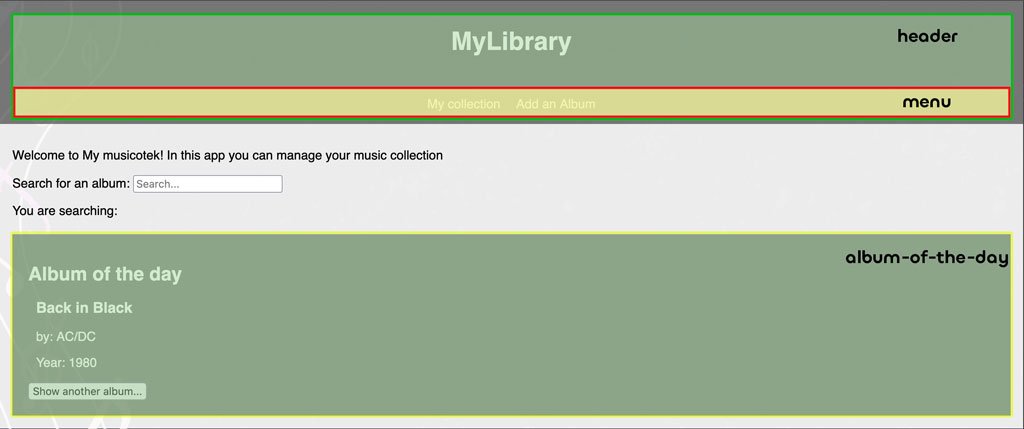
[HINT] Yes, the menu components is embedded in the header component!
- Each component will have its own template, style, and logic.
- You need to move the css from the
app.component.cssto the new component css files. - Example with
menucomponent:
<nav>
  <a>My collection</a>
  <a>Add an Album</a>
</nav>
nav {
  background-color: rgba(0,0,0,0.5);
  color: white;
  text-align: center;
  padding: 1em;
}
nav a {
  display: inline-block;
  margin: 0 10px;
  text-decoration: none;
}
- For the
album-of-the-daycomponent you also need to move some logic in the ts file:albumOfTheDayvariable and its's function.
Footer Component
- Create a new footer component that will display the current year.
Wrapping up
- After all the changes, the
app.component.tsshould only have thetitleandsearchTermvariables.
export class AppComponent {
  title = 'My musicotek'
  searchTerm: string = ''
}